
206 lines
9.4 KiB
Markdown
206 lines
9.4 KiB
Markdown
# django-mfa2
|
|
<<<<<<< Updated upstream
|
|
A Django app that handles MFA, it supports TOTP, U2F, FIDO2 U2F (Web Authn), Email Tokens , Trusted Devices and backup codes.
|
|
|
|
### Pip Stats
|
|
[](https://badge.fury.io/py/django-mfa2)
|
|
[](https://pepy.tech/project/django-mfa2)
|
|
|
|
### Conda Stats
|
|
[](https://anaconda.org/conda-forge/django-mfa2)
|
|
[](https://anaconda.org/conda-forge/django-mfa2)
|
|
[](https://anaconda.org/conda-forge/django-mfa2)
|
|
|
|
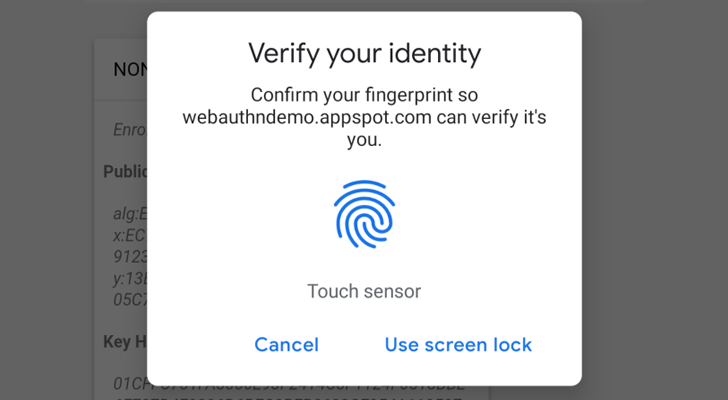
Web Authencation API (WebAuthn) is state-of-the art techology that is expected to replace passwords.
|
|
|
|
|
|
|
|
For FIDO2, the following are supported
|
|
* **security keys** (Firefox 60+, Chrome 67+, Edge 18+, Safari 13 on Mac OS, Chrome on Andriod, Safari on iOS 13.3+),
|
|
* **Windows Hello** (Firefox 67+, Chrome 72+ , Edge) ,
|
|
* **Apple's Touch ID/Face ID** (Chrome 70+ on Mac OS X, Safari on macOS Big Sur, Safari on iOS 14.0+ ),
|
|
* **android-safetynet** (Chrome 70+, Firefox 68+)
|
|
* **NFC devices using PCSC** (Not Tested, but as supported in fido2)
|
|
* **Soft Tokens**
|
|
* [krypt.co](https://krypt.co/): Login by a notification on your phone.
|
|
|
|
In English :), It allows you to verify the user by security keys on PC, Laptops or Mobiles, Windows Hello (Fingerprint, PIN) on Windows 10 Build 1903+ (May 2019 Update) Touch/Face ID on Macbooks (Chrome, Safari), Touch/Face ID on iPhone and iPad and Fingerprint/Face/Iris/PIN on Android Phones.
|
|
|
|
Trusted device is a mode for the user to add a device that doesn't support security keys like Android without fingerprints or NFC.
|
|
|
|
**Note**: `U2F and FIDO2 can only be served under secure context (https)`
|
|
|
|
Package tested with Django 1.8, Django 2.2 on Python 2.7 and Python 3.5+ but it was not checked with any version in between but open for issues.
|
|
|
|
Depends on
|
|
|
|
* pyotp
|
|
* python-u2flib-server
|
|
* ua-parser
|
|
* user-agents
|
|
* python-jose
|
|
* fido2==1.0.0
|
|
|
|
# Installation
|
|
1. using pip
|
|
|
|
`pip install django-mfa2`
|
|
2. Using Conda forge
|
|
|
|
`conda config --add channels conda-forge`
|
|
|
|
`conda install django-mfa2`
|
|
|
|
For more info, see the conda-forge repo (https://github.com/conda-forge/django-mfa2-feedstock)
|
|
|
|
Thanks for [swainn](https://github.com/swainn) for adding package to conda-forge
|
|
|
|
# Usage
|
|
1. in your settings.py add the application to your installed apps
|
|
```python
|
|
INSTALLED_APPS=(
|
|
'......',
|
|
'mfa',
|
|
'......')
|
|
```
|
|
2. Collect Static Files
|
|
`python manage.py collectstatic`
|
|
3. Add the following settings to your file
|
|
|
|
```python
|
|
from django.conf.global_settings import PASSWORD_HASHERS as DEFAULT_PASSWORD_HASHERS #Preferably at the same place where you import your other modules
|
|
MFA_UNALLOWED_METHODS=() # Methods that shouldn't be allowed for the user e.g ('TOTP','U2F',)
|
|
MFA_LOGIN_CALLBACK="" # A function that should be called by username to login the user in session
|
|
MFA_RECHECK=True # Allow random rechecking of the user
|
|
MFA_REDIRECT_AFTER_REGISTRATION="mfa_home" # Allows Changing the page after successful registeration
|
|
MFA_SUCCESS_REGISTRATION_MSG = "Go to Security Home" # The text of the link
|
|
MFA_RECHECK_MIN=10 # Minimum interval in seconds
|
|
MFA_RECHECK_MAX=30 # Maximum in seconds
|
|
MFA_QUICKLOGIN=True # Allow quick login for returning users by provide only their 2FA
|
|
MFA_ALWAYS_GO_TO_LAST_METHOD = False # Always redirect the user to the last method used to save a click (Added in 2.6.0).
|
|
MFA_RENAME_METHODS={} #Rename the methods in a more user-friendly way e.g {"RECOVERY":"Backup Codes"} (Added in 2.6.0)
|
|
MFA_HIDE_DISABLE=('FIDO2',) # Can the user disable his key (Added in 1.2.0).
|
|
MFA_OWNED_BY_ENTERPRISE = FALSE # Who owns security keys
|
|
PASSWORD_HASHERS = DEFAULT_PASSWORD_HASHERS # Comment if PASSWORD_HASHER already set in your settings.py
|
|
PASSWORD_HASHERS += ['mfa.recovery.Hash']
|
|
RECOVERY_ITERATION = 350000 #Number of iteration for recovery code, higher is more secure, but uses more resources for generation and check...
|
|
|
|
TOKEN_ISSUER_NAME="PROJECT_NAME" #TOTP Issuer name
|
|
|
|
U2F_APPID="https://localhost" #URL For U2F
|
|
FIDO_SERVER_ID=u"localehost" # Server rp id for FIDO2, it is the full domain of your project
|
|
FIDO_SERVER_NAME=u"PROJECT_NAME"
|
|
```
|
|
**Method Names**
|
|
* U2F
|
|
* FIDO2
|
|
* TOTP
|
|
* Trusted_Devices
|
|
* Email
|
|
* RECOVERY
|
|
|
|
**Notes**:
|
|
* Starting version 1.1, ~~FIDO_LOGIN_URL~~ isn't required for FIDO2 anymore.
|
|
* Starting version 1.7.0, Key owners can be specified.
|
|
* Starting version 2.2.0
|
|
* Added: `MFA_SUCCESS_REGISTRATION_MSG` & `MFA_REDIRECT_AFTER_REGISTRATION`
|
|
Start version 2.6.0
|
|
* Added: `MFA_ALWAYS_GO_TO_LAST_METHOD`, `MFA_RENAME_METHODS`, `MFA_ENFORCE_RECOVERY_METHOD` & `RECOVERY_ITERATION`
|
|
4. Break your login function
|
|
|
|
Usually your login function will check for username and password, log the user in if the username and password are correct and create the user session, to support mfa, this has to change
|
|
|
|
* authenticate the user
|
|
* if username and password are correct , check if the user has mfa or not
|
|
* if user has mfa then redirect to mfa page
|
|
* if user doesn't have mfa then call your function to create the user session
|
|
|
|
```python
|
|
def login(request): # this function handles the login form POST
|
|
user = auth.authenticate(username=username, password=password)
|
|
if user is not None: # if the user object exist
|
|
from mfa.helpers import has_mfa
|
|
res = has_mfa(username = username,request=request) # has_mfa returns false or HttpResponseRedirect
|
|
if res:
|
|
return res
|
|
return log_user_in(request,username=user.username)
|
|
#log_user_in is a function that handles creatung user session, it should be in the setting file as MFA_CALLBACK
|
|
```
|
|
5. Add mfa to urls.py
|
|
```python
|
|
import mfa
|
|
import mfa.TrustedDevice
|
|
urls_patterns= [
|
|
'...',
|
|
url(r'^mfa/', include('mfa.urls')),
|
|
url(r'devices/add$', mfa.TrustedDevice.add,name="mfa_add_new_trusted_device"), # This short link to add new trusted device
|
|
'....',
|
|
]
|
|
```
|
|
6. Provide `mfa_auth_base.html` in your templates with block called 'head' and 'content', The template will be included during the user login, the template shall be close to the login template.
|
|
If you will use Email Token method, then you have to provide template named `mfa_email_token_template.html` that will content the format of the email with parameter named `user` and `otp`.
|
|
7. To match the look and feel of your project, MFA includes `base.html` but it needs blocks named `head` & `content` to added its content to it.
|
|
**Note:** Starting v2.3.0, a new template `mfa_base.html` is introduced, this template is used by `MFA.html` so you can control the styling better and current `mfa_base.html` extends `base.html`
|
|
8. Somewhere in your app, add a link to 'mfa_home'
|
|
```<li><a href="{% url 'mfa_home' %}">Security</a> </li>```
|
|
|
|
|
|
For Example, See 'example' app and look at EXAMPLE.md to see how to set it up.
|
|
|
|
# Going Passwordless
|
|
|
|
To be able to go passwordless for returning users, create a cookie named 'base_username' containing username as shown in snippet below
|
|
```python
|
|
response = render(request, 'Dashboard.html', context))
|
|
if request.session.get("mfa",{}).get("verified",False) and getattr(settings,"MFA_QUICKLOGIN",False):
|
|
if request.session["mfa"]["method"]!="Trusted Device":
|
|
response.set_cookie("base_username", request.user.username, path="/",max_age = 15*24*60*60)
|
|
return response
|
|
```
|
|
|
|
Second, update the GET part of your login view
|
|
```python
|
|
if "mfa" in settings.INSTALLED_APPS and getattr(settings,"MFA_QUICKLOGIN",False) and request.COOKIES.get('base_username'):
|
|
username=request.COOKIES.get('base_username')
|
|
from mfa.helpers import has_mfa
|
|
res = has_mfa(username = username,request=request,)
|
|
if res: return res
|
|
## continue and return the form.
|
|
```
|
|
# Checking MFA on Client Side
|
|
|
|
Sometimes you like to verify that the user is still there so simple you can ask django-mfa2 to check that for you
|
|
|
|
```html
|
|
{% include 'mfa_check.html' %}
|
|
```
|
|
````js
|
|
function success_func() {
|
|
//logic if mfa check succeeds
|
|
}
|
|
function fail_func() {
|
|
//logic if mfa check fails
|
|
}
|
|
function some_func() {
|
|
recheck_mfa(success_func,fail_func,MUST_BE_MFA)
|
|
//MUST_BE_MFA true or false, if the user must has with MFA
|
|
}
|
|
|
|
````
|
|
|
|
# Contributors
|
|
* [mahmoodnasr](https://github.com/mahmoodnasr)
|
|
* [d3cline](https://github.com/d3cline)
|
|
* [swainn](https://github.com/swainn)
|
|
* [unramk](https://github.com/unramk)
|
|
* [willingham](https://github.com/willingham)
|
|
* [AndreasDickow](https://github.com/AndreasDickow)
|
|
* [mnelson4](https://github.com/mnelson4)
|
|
* [ezrajrice](https://github.com/ezrajrice)
|
|
* [Spitfireap](https://github.com/Spitfireap)
|
|
* [peterthomassen](https://github.com/peterthomassen)
|
|
|
|
|
|
# Security contact information
|
|
To report a security vulnerability, please use the [Tidelift security contact](https://tidelift.com/security). Tidelift will coordinate the fix and disclosure.
|